
Activity Log
Find every conversation and workflow run in the admin console, inspect details, or clean up records
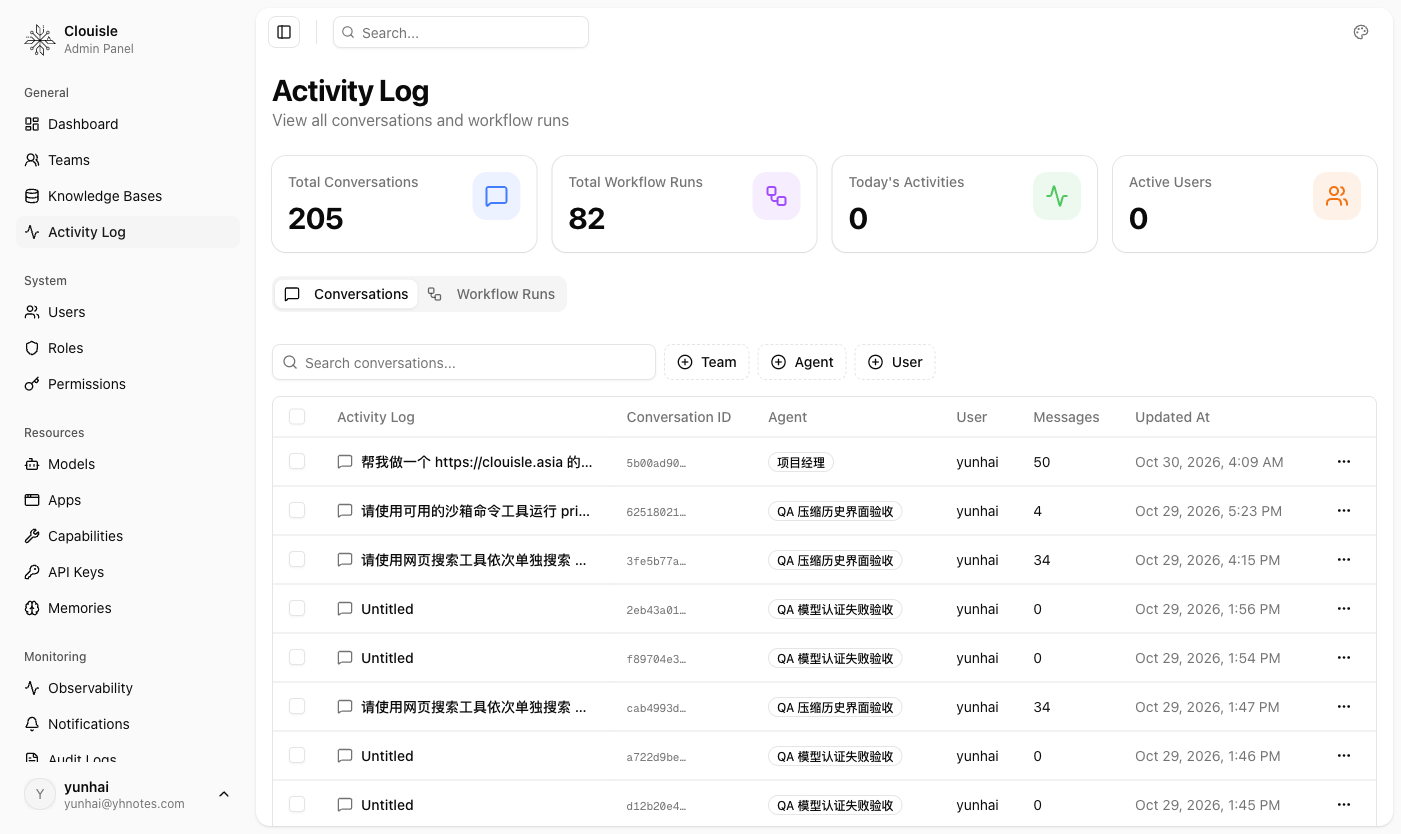
Activity Log is the admin console's global view. It is not scoped to one Agent or one workflow; it puts conversations and workflow runs from across the platform on one page. Support reviewing what a user asked, operations checking whether last night's scheduled job succeeded, or an auditor removing a conversation that contains sensitive data all start here.
Open the Activity Log
- Sign in as an administrator.
- In the admin sidebar, select Activity Log (
/activities). - Four cards show total conversations, total workflow runs, today's activity, and active users.
There are two tabs:
- Conversations: chat sessions from every Agent on the platform.
- Workflow Runs: run records from every workflow on the platform.
Visibility follows permissions. Viewing conversations requires the admin conversation read permission; viewing workflow runs requires the workflow read permission. Without delete permission, the delete actions are hidden.
Conversations tab
Filters and search
| Control | Effect |
|---|---|
| Search conversations | Search the session title or first message; results refresh automatically |
| Team | Filter by one or more teams |
| Agent | Filter by one or more Agents |
| User | Filter by the user who owns the session; the picker supports searching users |
Filters stay in the URL, so refreshing keeps them.
Table and details
| Column | Description |
|---|---|
| Activity Log | Session title (usually the first user message), with a session icon |
| Conversation ID | First 8 characters of the UUID; click to copy the full ID |
| Agent | Agent that produced the session |
| User | User who owns the session |
| Messages | Total messages in the session |
| Updated At | Time of the last message |
Click a row or View details to open a right-side drawer with the full message list, variables, model, and timestamps. The drawer is read-only; go back to the table to delete.
Delete
- Single: open the row menu and choose Delete, then confirm.
- Bulk: select multiple rows and choose Delete selected.
- Deletion is permanent. Export or capture evidence first if you need it.
Deleting a conversation removes its messages but not the Agent, knowledge base, or workflow. Sessions created by external channels (Feishu, WeChat) are managed here too.
Workflow Runs tab
Filters and search
| Control | Effect |
|---|---|
| Search | Search by run ID or workflow name |
| Workflow | Filter by workflow |
| Status | Success, failed, running, pending, waiting, cancelled, or timeout |
| Trigger type | Manual, Webhook, or scheduled |
| Triggered by | Filter by the user who started the run |
| Debug runs only | Show only runs produced in debug mode |
| Untitled only | Show only runs without a title |
Table and details
| Column | Description |
|---|---|
| Run ID | First 8 characters of the run UUID |
| Workflow | Owning workflow |
| Status | Colored status badge with an icon |
| Trigger type | Manual / Webhook / scheduled |
| Triggered by | User for manual runs; scheduled and Webhook runs may be empty |
| Duration | Elapsed time from start to finish |
| Created At | Run creation time |
Choose View details to open the run drawer: basic info, execution stats, inputs/outputs, node executions, and errors. Failed nodes and durations are highlighted; debug runs carry a Debug badge.
Delete
Select one or more runs and choose Delete selected. This removes the record only; it does not undo side effects the workflow already produced.
How this differs from other entry points
| Entry point | Location | Scope | Best for |
|---|---|---|---|
| Activity Log | Admin console /activities | All users across the platform | Audit, support review, cleanup |
| Agent Logs | Agent sidebar Logs | Your own sessions for the current Agent | Debugging one Agent |
| Workflow Logs | Workflow menu Logs | Run history for the current workflow | Debugging one workflow |
| Monitor / Observability | Agent Monitor, admin Observability | Aggregate metrics and health | Trends, latency, error rates |
FAQ
Why can't I see a conversation?
Confirm you have the admin conversation read permission, then check whether the team, Agent, or user filter excludes it. Shared resources still appear, but a read-only share does not change visibility here.
Can a deleted record be restored?
No. Conversations and run records are hard-deleted; there is no recycle bin. Export or save what you need first.
Why is "Triggered by" empty for a scheduled run?
That is expected. Scheduled and Webhook runs have no signed-in user, so the column is empty. Locate them by trigger type and time.
Related pages
- Audit logs — administrative operations and security events, not message content
- Chat and conversations — chat and logs for one Agent
- Debug workflows — run traces and node errors
How is this guide?