

Connect an Agent to Your App (API)
Call an Agent with an API key or login token, stream replies, and handle questions and tool confirmations
Once an Agent is tuned, the next step is often putting it inside another system: a support widget, an internal ticket page, a service behind a chat bot, or your own automation script. The API Access page breaks this into three things: the endpoint, the credential, and the message format.
You do not need your own conversation store. Clouisle persists every conversation, run state, and tool result; the API only streams new output back to you.
When to use it
- Add an assistant to an existing product: your page owns the UI; Clouisle owns the model, knowledge, and tools.
- Batch or background work: a script submits questions and writes results back into a business system.
- Mobile apps or mini programs: there is no browser login session, so an API key represents the caller.
- Resumable work: run state lives on the server, and a dropped connection can resubscribe by run ID.
If you only want to embed an existing chat window, skip the API and use web embedding. The API is for cases where you control the interface and interaction flow.
Open the API page
- Go to Apps and open the target Agent.
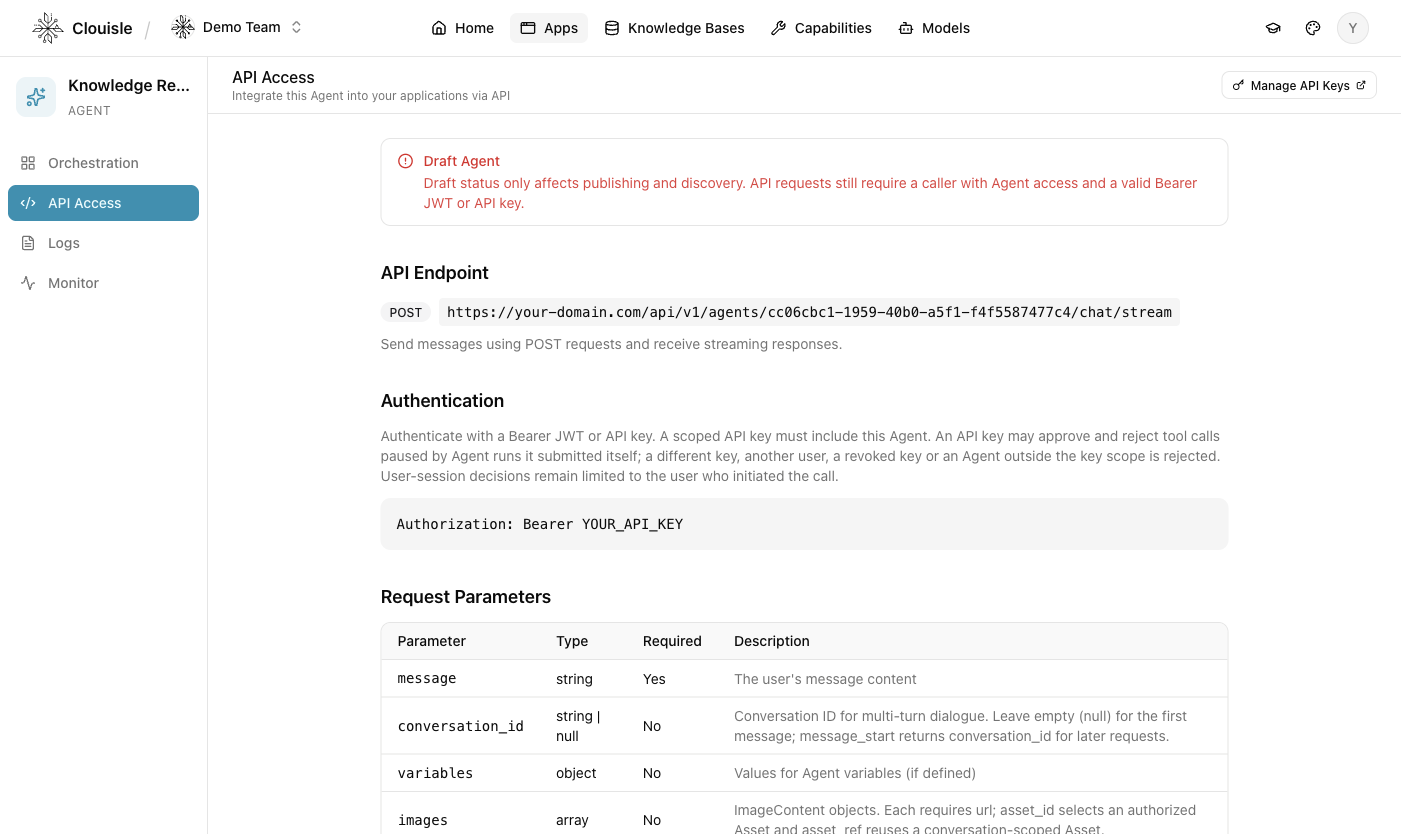
- In the left sidebar, select API Access (next to Orchestration, Logs, and Monitor).
- The page shows the streaming endpoint, authentication options, and parameter tables for this Agent.
A draft Agent can still be called by an authorized caller; draft status only affects publishing and discovery. However, API keys only list published Agents for binding, so publish the Agent before binding it to a key.
Prepare a credential
Choose one:
| Credential | Best for | How to get it |
|---|---|---|
| Login token (JWT) | An already signed-in frontend or internal system | Obtain it from the login API and call as that user |
| API key | Services, scripts, and third-party pages without a user session | Create a clou_ key under API Keys |
With an API key:
- The key runs as its creator; that user's role, team membership, and Agent access all apply.
- The key must include this Agent; an unbound key or a key bound to another Agent is rejected.
- A key may approve or reject tool calls paused by runs it submitted itself; another key, another user, or a revoked key cannot.
Never ship an API key in frontend code
An API key carries its creator's access. Browsers, mobile bundles, and public repositories leak it easily. For public access, prefer an embed key with a restricted resource list.
Send the first message
Endpoint:
POST /api/v1/agents/{agent_id}/chat/stream
Authorization: Bearer YOUR_API_KEY
Content-Type: application/json
Request body:
| Field | Required | Description |
|---|---|---|
message | Yes | The user message |
conversation_id | No | Conversation ID for multi-turn chat; omit it on the first call and reuse the ID returned by message_start |
variables | No | Values for Agent-defined variables |
images | No | Image inputs; each item needs url, or use asset_id / asset_ref to reuse an authorized asset |
file_urls | No | Upload responses (filename, url, mime_type, size) |
Minimal example:
curl -N -X POST "https://your-domain.com/api/v1/agents/550e8400-e29b-41d4-a716-446655440000/chat/stream" \
  -H "Authorization: Bearer clou_xxx" \
  -H "Content-Type: application/json" \
  -d '{"message":"Summarize the key terms of this contract","variables":{}}'
The response is Server-Sent Events (SSE): each data: line is a JSON event. Text arrives incrementally, and tool calls and state changes appear as their own events.
Read the event stream
| Event | What you get |
|---|---|
message_start | Conversation ID and message ID; pass the conversation ID on later turns |
content_delta | Incremental answer text |
reasoning_start / reasoning_delta / reasoning_end | Model reasoning (when the model provides it and the Agent does not hide it) |
rag_start / rag_context | Retrieval start and matched documents |
tool_call / tool_result | Tool name, original arguments, result, or error |
compression_start / compression_end | Context compression start and end; compressed content is not included |
message_end | Usage, duration, and message version |
run_start / run_status / run_end | Run lifecycle; run_end always arrives with completed, stopped, failed, or interrupted |
error | Error code and readable message |
Exact fields and ordering live in Agents API and Chat API.
Handle pauses: questions and tool confirmations
Some runs do not finish immediately; they enter waiting. Do not resend the same message, or you will create a new run.
The Agent asks the user (ask_user)
When run_status has pending_tool_name: "ask_user", the run is waiting for answers. Submit them to:
POST /api/v1/agents/{agent_id}/chat/runs/{run_id}/answersFill answers by question ID. To skip the whole form, send {"skipped": true, "answers": {}}. Validation and error codes are in Chat API.
A tool needs caller confirmation
run_status.pending_tool_input carries interaction_kind: "tool_approval" and an execution_id. The tool has not run yet:
- Read and decide with the same credential that started the run.
- A JWT can only decide runs that user started; an API key can only decide runs submitted with that same key.
- Approval resumes the run from the pause; rejection cancels that call.
- When several calls pause together, decide each independently; they resume in order.
The decision endpoint and body are in Agents API. Workflows, embeds, and scheduled entry points never prompt for confirmation; if a tool requires it, they fail instead of silently allowing it.
Long-running work
/chat/stream keeps the connection open until the turn ends. If a job may run long or clients disconnect often, use durable runs:
POST /api/v1/agents/{agent_id}/chat/runscreates a run and immediately returns202with arun_id.GET /api/v1/agents/{agent_id}/chat/runs/{run_id}/stream?after_sequence=Nsubscribes to events; reconnect with the last sequence you received.- Call
/stopwhen you need to cancel.
The in-browser chat page uses the same durable-run mechanism, so refreshing does not lose the task.
Common errors
| Symptom | Cause | Fix |
|---|---|---|
401 or authentication failure | Invalid, expired, or disabled key; expired token | Check the Authorization header and key status |
403 or Agent unavailable | Key does not include this Agent, or its creator lost access | Rebind the Agent in the key, or use a credential with access |
| First reply works, the next has no context | The conversation_id from message_start was not sent back | Pass the same conversation_id on later turns |
The run stays in waiting | It is waiting for an ask_user answer or tool confirmation | Submit the answer or decision; do not resend the message |
| A tool call is rejected | Team policy requires caller confirmation, or the tool is not allowed | Confirm as the caller, or use a tool that does not require confirmation for non-interactive entry points |
| Answers get shorter after compression | History was summarized and older tool results folded | Keep each turn smaller, or have the Agent work in steps |
Related pages
- API keys — create, bind, and revoke keys
- Standalone runs and web embedding — embed without writing code
- Chat and conversations — questions, confirmations, and versions in the chat UI
- Tool connections and caller confirmation — approval policy and resume rules
How is this guide?