
Image and Scanned Document Parsing
Turn scanned PDFs, screenshots, and embedded images into searchable text and descriptions
A lot of knowledge is not in selectable text: contracts are scans, product details hide in slide images, and receipts or reports exist only as screenshots. Image parsing sends images to a vision or OCR model during document processing, extracts visible text, and generates factual descriptions, then indexes both alongside the surrounding text.
The feature is off by default and configured once by a site administrator. Images are sent to an external model provider, which costs money and may move data outside your deployment; confirm compliance before enabling it.
When to use it
- Scanned contracts, invoices, and forms: no text layer, so ordinary parsing returns nothing.
- Slides and DOCX images with labels: charts, flow diagrams, and product screenshots hold the answer.
- Images in Excel workbooks: product photos, QR codes, or diagrams next to cells.
- Direct image uploads: screenshots, photos, and posters.
If a document already has a complete text layer, you do not need this; enabling it still analyzes images and adds processing time and cost.
Admin configuration
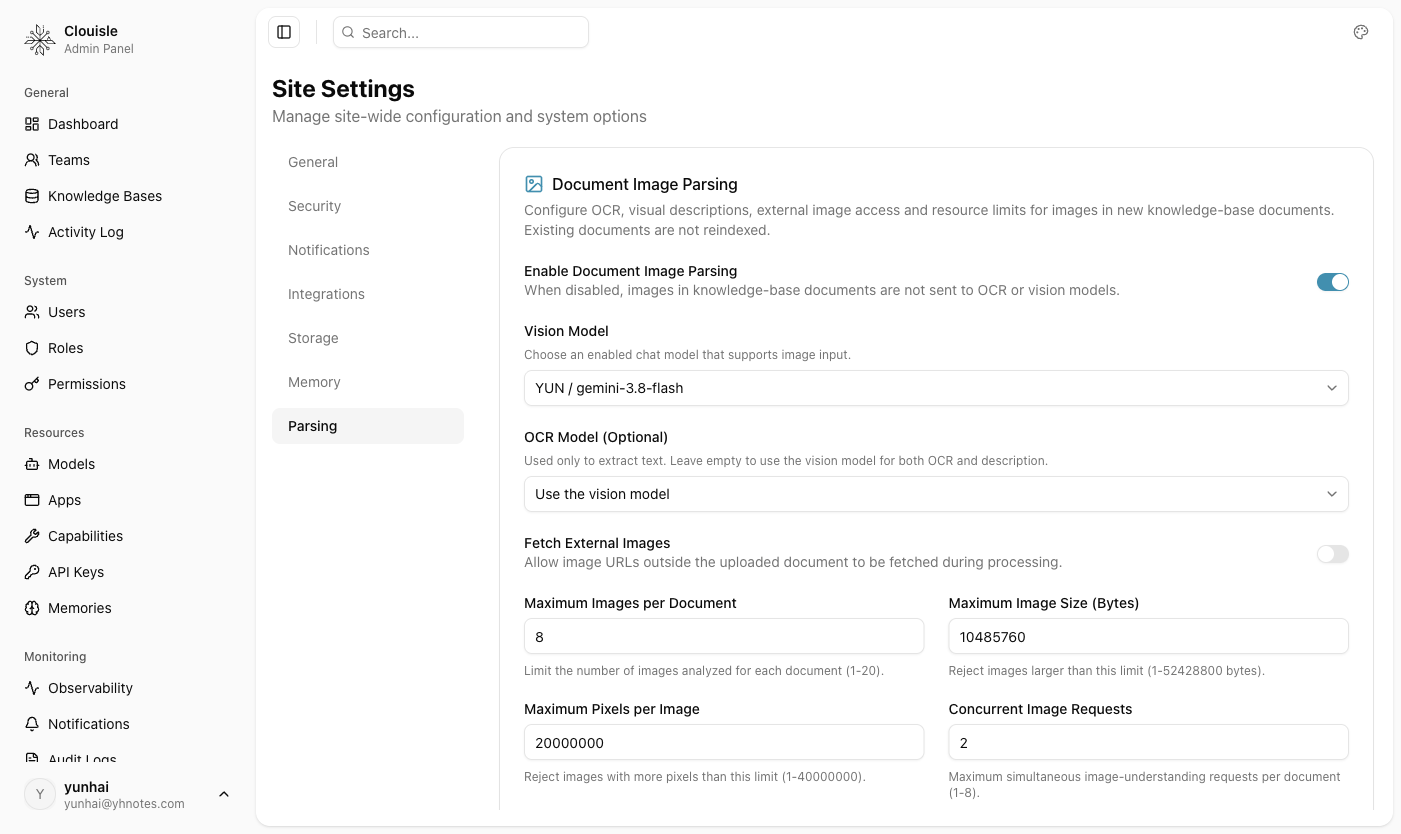
- Sign in as an administrator and open Site Settings.
- Choose Parsing (
/site-settings/parsing). - Turn on Enable Document Image Parsing.
- Choose a Vision model: an enabled chat model that accepts image input and is authorized for the team processing the document.
- Optionally choose an OCR model: it only extracts text. Leave it empty to let the vision model do both OCR and description.
- Optionally enable Fetch external images: this only affects image URLs referenced by documents and is off by default.
- Adjust resource limits and save.
| Setting | Default | Range | Description |
|---|---|---|---|
| Enable document image parsing | Off | On/off | When off, images are never sent to a model |
| Vision model | Empty | Enabled image-input model | Produces text and visual descriptions |
| OCR model | Empty | Enabled image-input model | Text-only extraction; empty reuses the vision model |
| Fetch external images | Off | On/off | Whether to fetch image URLs referenced by documents |
| Max images per document | 8 | 1-20 | Images beyond this are not analyzed |
| Max bytes per image | 10485760 | 1-52428800 | Larger images are rejected |
| Max pixels per image | 20000000 | 1-40000000 | Images above this are rejected |
| Concurrent image requests | 2 | 1-8 | Maximum simultaneous analysis requests per document |
At least one model is required
Enabling the switch requires a vision model, an OCR model, or both; clearing the last model fails to save. The model must also be authorized for the document's team, otherwise processing reports an error instead of silently skipping.
How users use it
Image parsing happens during processing; there is no extra checkbox at upload time:
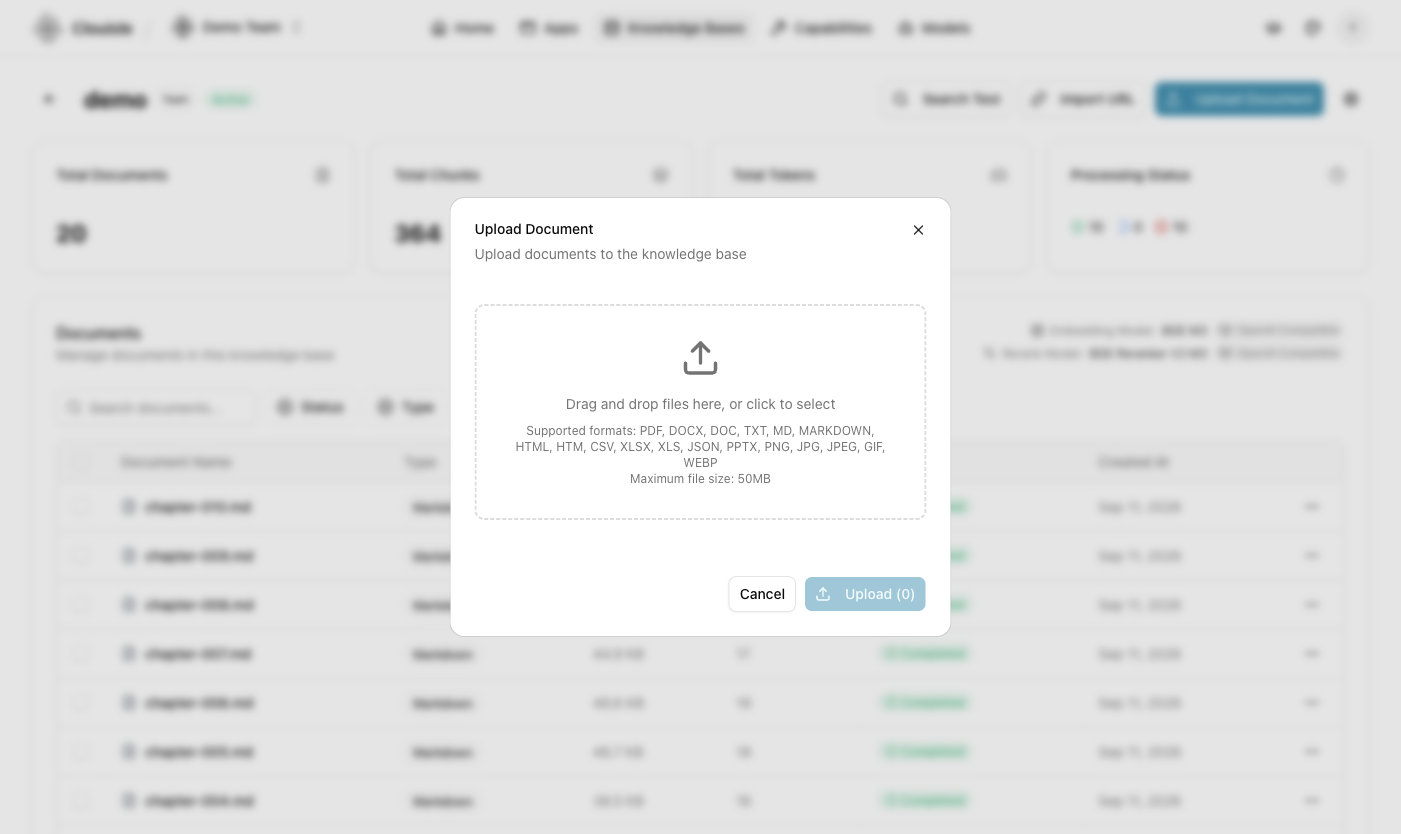
- Upload a document (PDF, DOCX, PPTX, XLSX, or an image), or collect one from WeChat.
- Process it normally: quick process, or preview chunks and then submit.
- When processing completes, OCR text and image descriptions appear in the relevant chunks and are returned by retrieval.
Supported sources
| Source | How it is handled |
|---|---|
| Scanned or mixed PDF | Text is extracted per page; pages that need it are rendered as images and analyzed |
| DOCX / PPTX | Embedded images are extracted with their paragraph or slide position |
| XLSX | Images are extracted with their sheet and anchor |
| Standalone image | PNG, JPEG, GIF, and WebP are processed as a document |
| External image | URLs referenced by a document; fetched only when the administrator allows it, after SSRF validation |
What gets indexed
- Text: readable content from the image, indexed as part of the chunk.
- Description: factual description of charts, interfaces, and photos, without inventing details.
- Source position: chunks keep page, slide, or sheet references so answers can cite them.
- The image itself: still served through the protected file endpoint; the index stores no original image and creates no public link.
Model output is treated as untrusted document content: instructions inside an image are not executed as system prompts, and descriptions are sanitized before indexing.
Cost, privacy, and limits
- Cost: every image calls a vision or OCR model and is billed by the provider; large documents can add significant time and tokens.
- Data leaving the deployment: images go to the configured provider. Confirm policy before processing ID cards, medical images, or other sensitive material.
- Not a replacement for OCR review: handwriting, low resolution, rotation, and occlusion reduce accuracy; verify critical numbers manually.
- Duplicate text: a mixed PDF can have both a text layer and image OCR, so chunks may contain repeated content. This is a known limitation.
- External images: off by default. Even when enabled, private networks, loopback, and cloud metadata addresses are rejected.
- Historical documents: only documents processed after enabling are affected. Existing documents are not reprocessed automatically; run Reprocess manually.
Failures and retries
| Symptom | Cause | Fix |
|---|---|---|
| Images are skipped | Count, byte, or pixel limit exceeded | Compress the image, or ask an administrator to raise the limit |
| A standalone image fails with no extracted text | There was no recognizable text and only an OCR model is configured | Configure a vision model for descriptions, or use a readable image |
| Model unavailable / unauthorized | The team lacks authorization, or the model is disabled | Grant access in model management or choose another model |
| External image fetch fails | Unreachable URL, SSRF rejection, or timeout | Disable external fetching, or upload the image inside the document |
| Whole document fails | Model error or quota exhaustion | Read the document error, fix it, then retry failed chunks |
Retry only reruns failed chunks. If you changed the site-level model configuration, reprocess the whole document so one document does not mix output from two models.
Related pages
- Import documents — upload, URL import, and processing states
- Chunking and document processing — preview, retry, and reprocess
- Site settings — other parsing limits
- Knowledge settings reference — fields and defaults
How is this guide?